

Customizing HTML Codeblocks with Highlight.JS
3 minutes read
Syntax highlighting is an intrinsic part of IDEs and text editors that makes code more readable as it uses color schemes to differentiate attributes of a given programming language, but it’s tricky to manually recreate a console with HTML code blocks used in websites or markdown documents to the extent of built-in themes in IDEs and text editors. Although there is the option to keep the code block appearance pretty minimal, dynamic scripting languages, like JavaScript, have made it possible to bring the styling nuances of IDE and text editor themes to HTML.
There are a number of syntax highlighters designed for the web, but the one I became most familiar with after creating a blogdown site was highlight.js because it was included as an option in my theme’s config file.
# Sets options for highlight.js
  highlightjs           = true
  highlightjsVersion    = "9.16.2"
  highlightjsCDN        = "//cdnjs.cloudflare.com/ajax/libs"
  highlightjsTheme      = "dracula"
  highlightjsLang       = ["html", "css", "js", "toml", "r"]
If highlight.js is set to false, you can chose to syntax highlight however you want, including manually customizing colors with HTML and CSS. In HTML, the <pre> and <code> elements are analogous to the triple backtick in markdown syntax that creates a code block. The <pre> tag displays the text before it becomes formatted, which would otherwise happen with other elements like <p> or <div> and the <code> tag wrapped within <pre> specifies the preformatted text is computer code.
The <pre> and <code> tags can be styled with CSS in the same manner typical of other HTML tags.
  pre {
	width: 50%;
        height: 200px;
	padding: 0;
	margin: 0;
	overflow: auto;
	overflow-y: hidden;
	font-size: 12px;
	line-height: 20px;
	background: #E4E2DA;
	border: 1px solid #777;
        font-family: "Lucida Console", Courier, monospace;

}
pre code {
	padding: 10px;
	color: #333;
}
The resulting code block from the CSS example above looks like this:
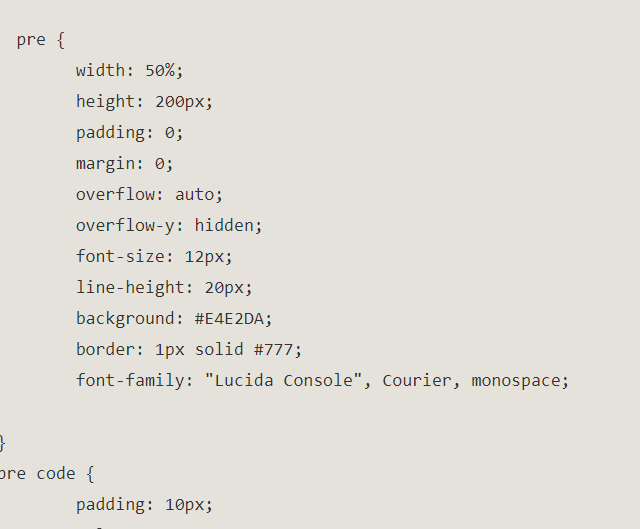
Even if highlight.js is enabled, the CSS for the <pre> and <code> tags will still apply to the font, text size and styling of the code container, but the color scheme of the highlight.js theme will take precedence over any background and font color properties specified in the stylesheet.
The rest of the global variables in the config file define the version, the CDN (content delivery network) location where the highlight.js script is originating from, the name of the theme and the languages where the syntax highlighting will apply. The full code for highlight.js in the site template pages looks like this
<link rel="stylesheet"

#The CDN host link, version and theme is defined in this line
href="//cdnjs.cloudflare.com/ajax/libs/highlight.js/10.1.2/styles/default.min.css">

#The CDN host link and version is defined in this line
<script src="//cdnjs.cloudflare.com/ajax/libs/highlight.js/10.1.2/highlight.min.js"></script>

#The languages are defined in this line
<script charset="UTF-8"
src="https://cdnjs.cloudflare.com/ajax/libs/highlight.js/10.1.2/languages/go.min.js"></script>
There are a couple of ways to call the script for highlight.js other than in the above code. To use it in RMarkdown, all you need is the theme’s .css filename, which can be found in the styles directory of the highlight.js github page.
<style type="text/css">
@import "https://highlightjs.org/static/demo/styles/tomorrow.css";
</style>
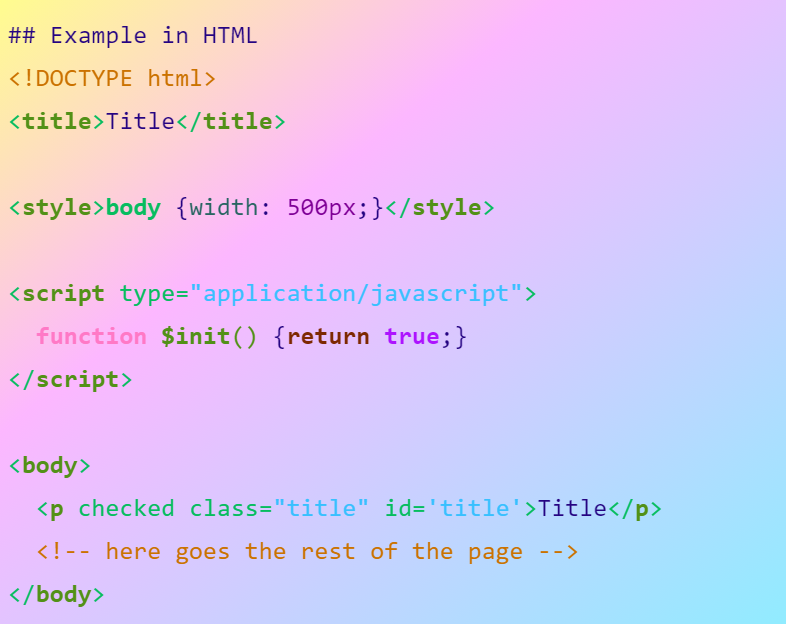
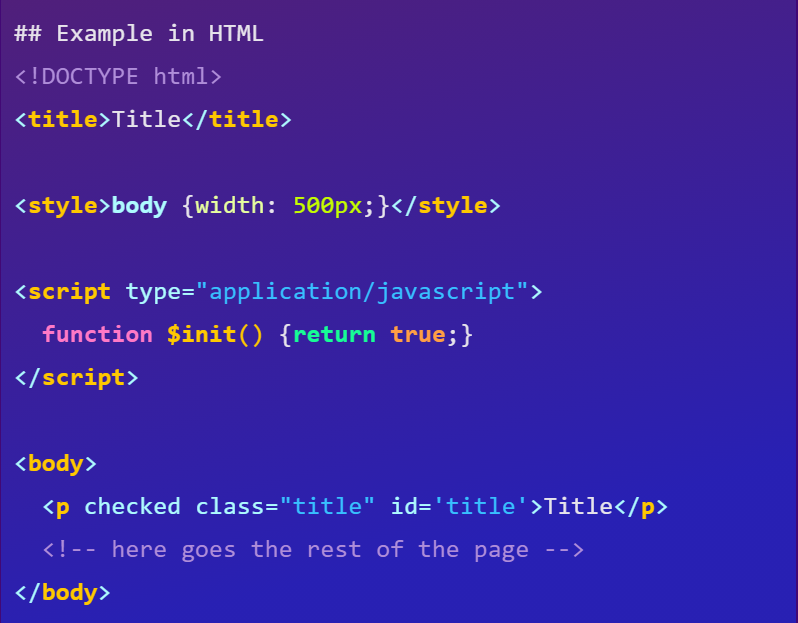
I used the Dracula theme for this site (which is the same theme I use in my RStudio console). As of the current version, 10.2.0, highlight.js has 95 styles, two of which are my very own 😀! To use either of the themes on your own website or markdown, you can copy and paste the codes below.
Gradient Light
<link rel="stylesheet"
      href="//cdnjs.cloudflare.com/ajax/libs/highlight.js/10.2.0/styles/gradient-light.min.css">
<script src="//cdnjs.cloudflare.com/ajax/libs/highlight.js/10.2.0/highlight.min.js"></script>
<!-- and it's easy to individually load additional languages -->
<script charset="UTF-8"
 src="https://cdnjs.cloudflare.com/ajax/libs/highlight.js/10.2.0/languages/go.min.js"></script>
Gradient Dark
<link rel="stylesheet"
      href="//cdnjs.cloudflare.com/ajax/libs/highlight.js/10.2.0/styles/gradient-dark.min.css">
<script src="//cdnjs.cloudflare.com/ajax/libs/highlight.js/10.2.0/highlight.min.js"></script>
<!-- and it's easy to individually load additional languages -->
<script charset="UTF-8"
 src="https://cdnjs.cloudflare.com/ajax/libs/highlight.js/10.2.0/languages/go.min.js"></script>